Features
A complete pipeline from modern Mac to vintage Akai
Library
Index everything. Copy nothing.
Point S-Convert at your sample folders and it builds a local index — nothing is ever written into your folders, and unplugging a drive doesn't lose your tags. Search across samples, folders, tags, programs and disk images; filter by rating, category, BPM, key, color and favorites; audition with a click.
- Watched folders with automatic re-scanning
- Tags, ratings and favorites that survive offline drives
- One-click audition, Apple Loops style
- Drag folders straight into Akai groups — no duplication
Build
The four-phase Akai build
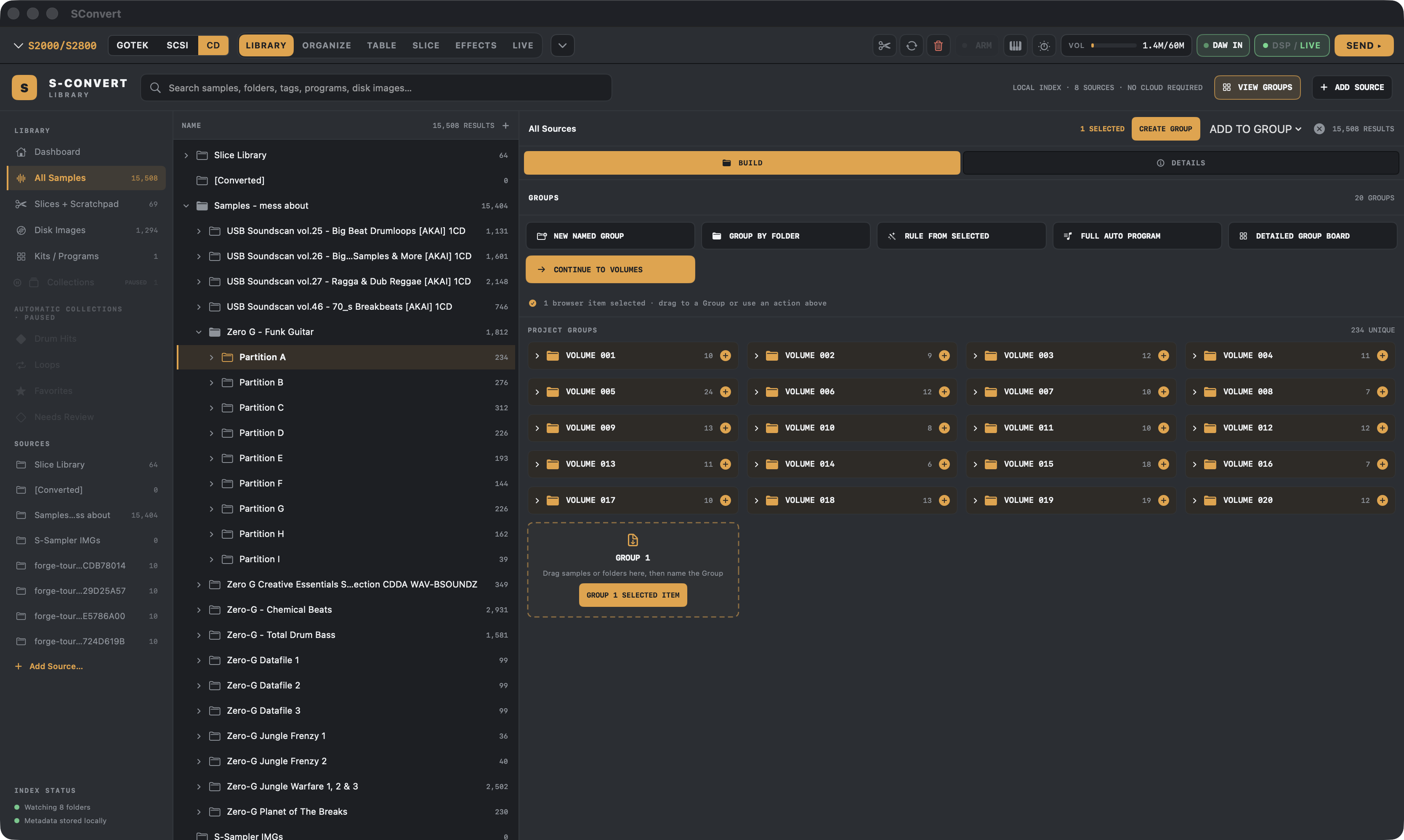
Akai samplers think in Volumes, Programs and Keygroups. S-Convert makes that structure visible and editable instead of hiding it behind a one-shot converter.
Gather
Collect samples from your library and build named groups — straight from watched folders, no copying.
Volumes
Fill real Akai containers. Auto-pack safely against true capacity limits, preview the plan, apply atomically.
Map
Lay samples across keys or pads, with velocity layers that respect the target sampler's limits.
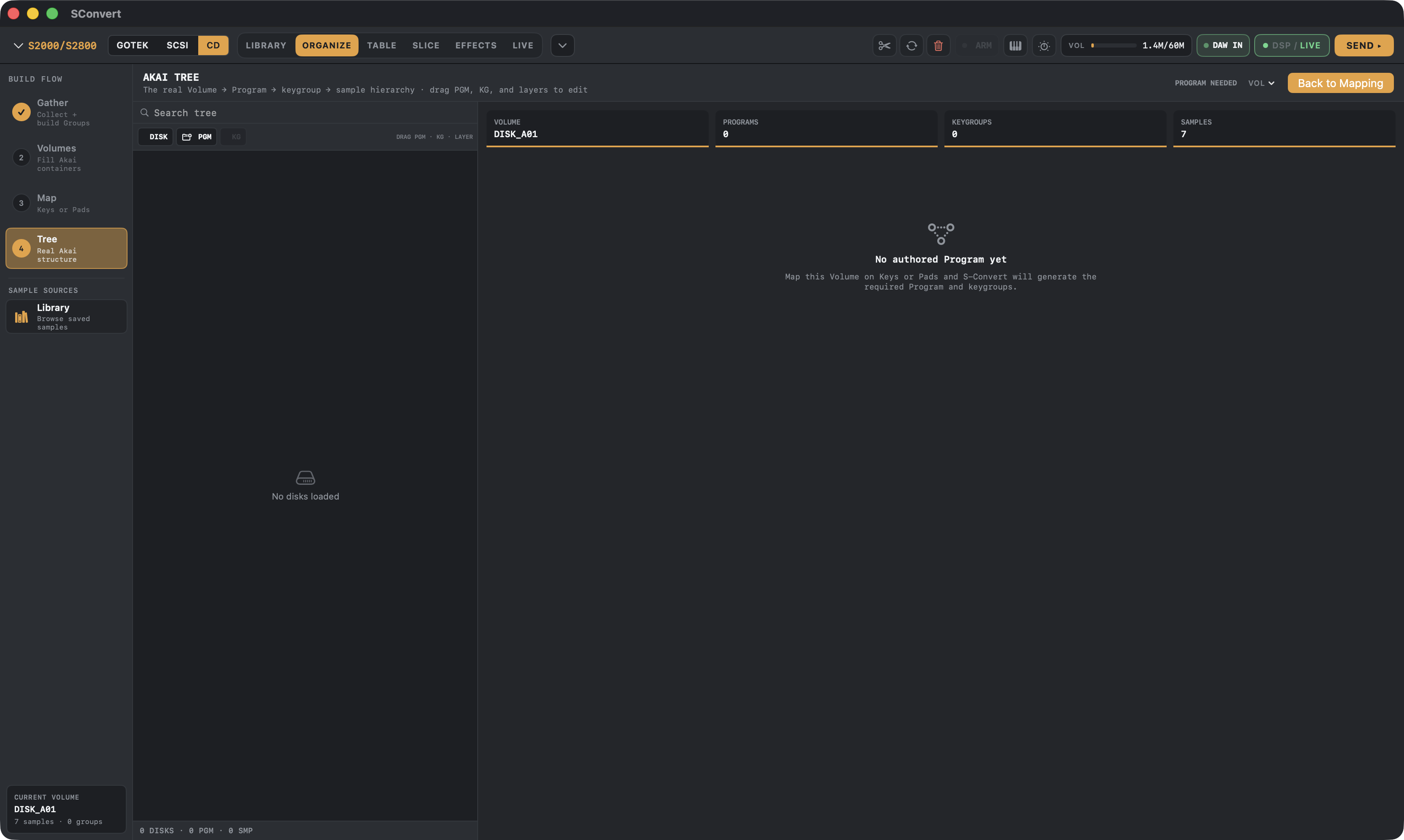
Tree
Edit the real Akai structure — Volume → Program → Keygroup → layer — with drag-and-drop that refuses unsafe moves.
Slice
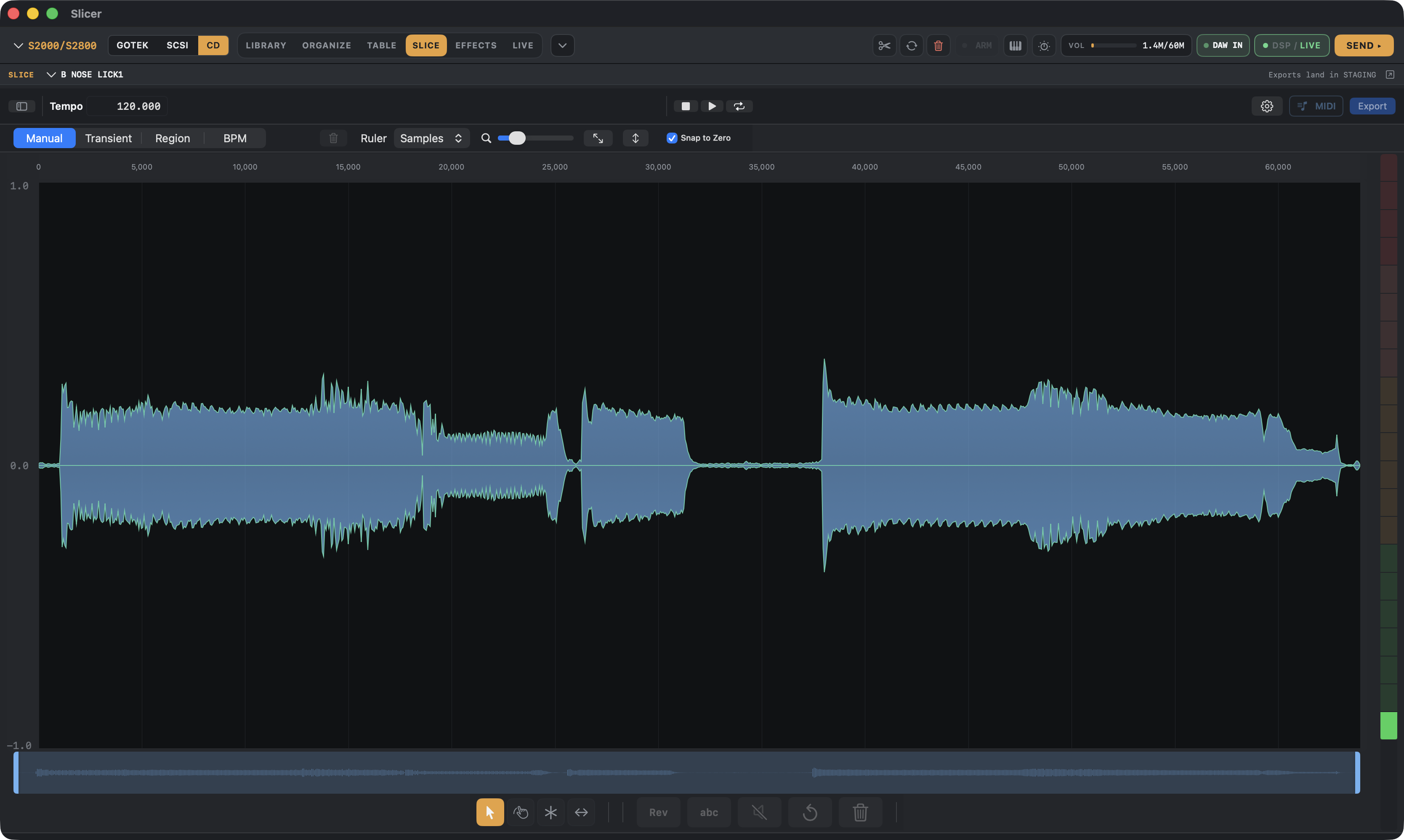
Slice breaks where they want to be sliced
Manual, transient, region and BPM slicing modes with zero-crossing snap, per-slice audition, reverse and normalize — and every slice lands in your staging area ready to map.
Console FX
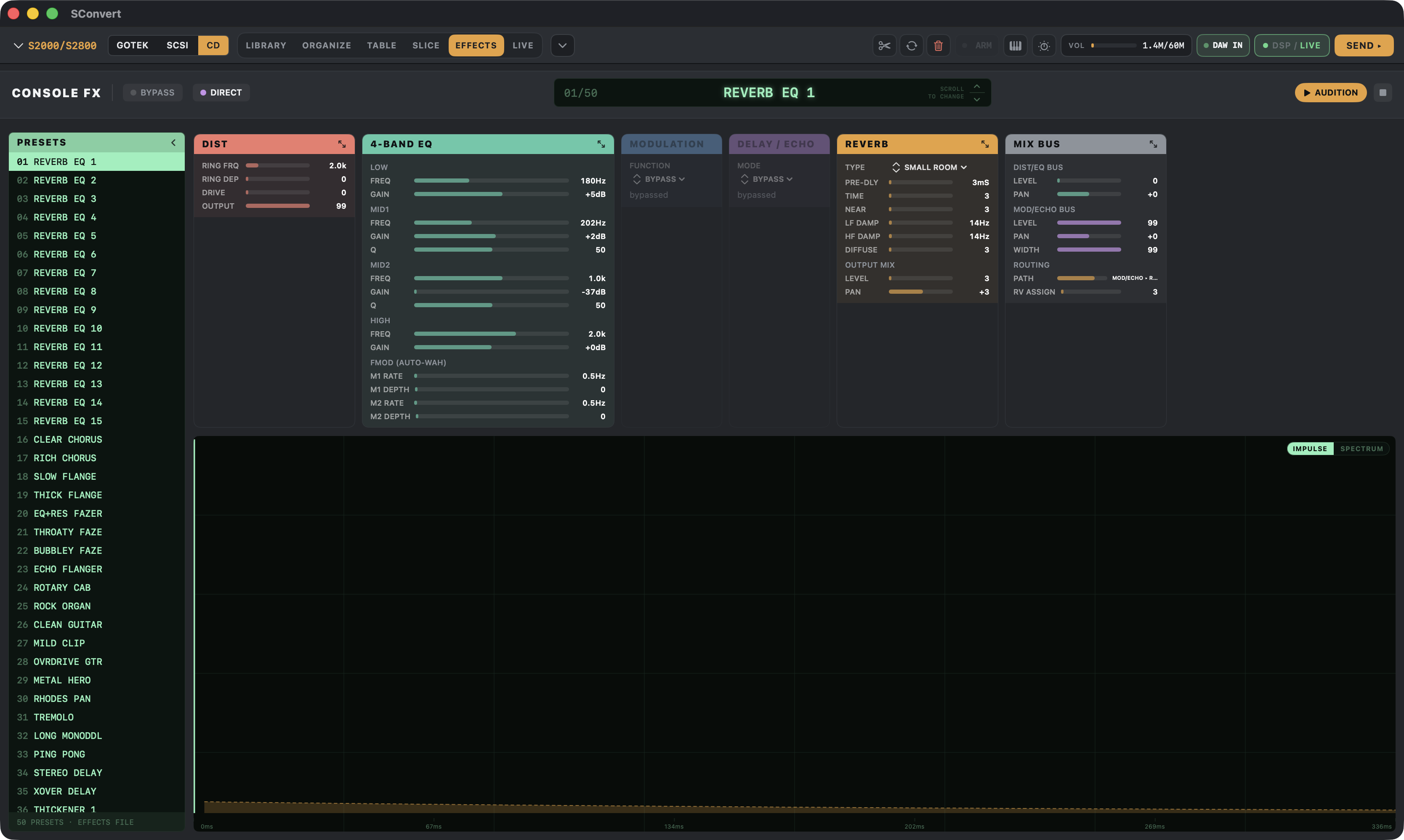
Every FX parameter on one screen, not one LCD page at a time
Console FX puts the sampler's effect settings on your Mac — 4-band EQ, distortion, modulation, delay/echo and reverb across a 50-slot preset list, every parameter visible and draggable at once instead of paged through the hardware's tiny display. Built-in DSP previews roughly what a setting will sound like as you dial it in, and the vintage preview keyboard models each Akai's filter and level behavior.
New — MPC support
Native kits for classic MPCs
The newest addition to the beta: build kits for Akai MPCs in their native formats. The MPC60, MPC3000 and MPC2000/XL get real SND + PGM programs plus the media they boot from — an 800 KB Gotek floppy image for the 60, a 1.44 MB floppy image for the 2000XL, and a ZuluSCSI Zip image for the 3000. The MPC1000/2500/500 family gets WAV + PGM folders, and modern MPC 2 machines get keygroup XPM + WAV.
- MPC60 / MPC60-IISND + PGM kits · 800 KB Gotek floppy image
- MPC3000SND + PGM kits · ZuluSCSI Zip image
- MPC2000 / MPC2000XLSND + PGM kits · 1.44 MB Gotek floppy image
- MPC1000 / MPC2500 / MPC500WAV + PGM folders
- MPC 2 / modernKeygroup XPM + WAV folder
Brand new — no MPC output has been loaded on a real MPC yet. MPC owners in the beta, your load reports shape this feature.
Beta — other samplers
35 sampler families beyond Akai, untested on hardware
The Stage → Place → Map → Convert workflow now targets samplers from E-mu, Ensoniq, Roland, Yamaha, Korg, Kurzweil, Casio, Fairlight, Sequential, Oberheim and Peavey: native banks, raw and HFE disk images, SCSI images, card trees and SysEx dumps, depending on what the machine reads. Each target has its own mapping, loop, tuning, envelope, filter and media options.
Software-verified only. The output reopens in S-Convert and in independent tools, but none of these formats has been loaded on the real sampler. Work from backups and treat every file as untested until the formats page says otherwise.
Per-model status and limitations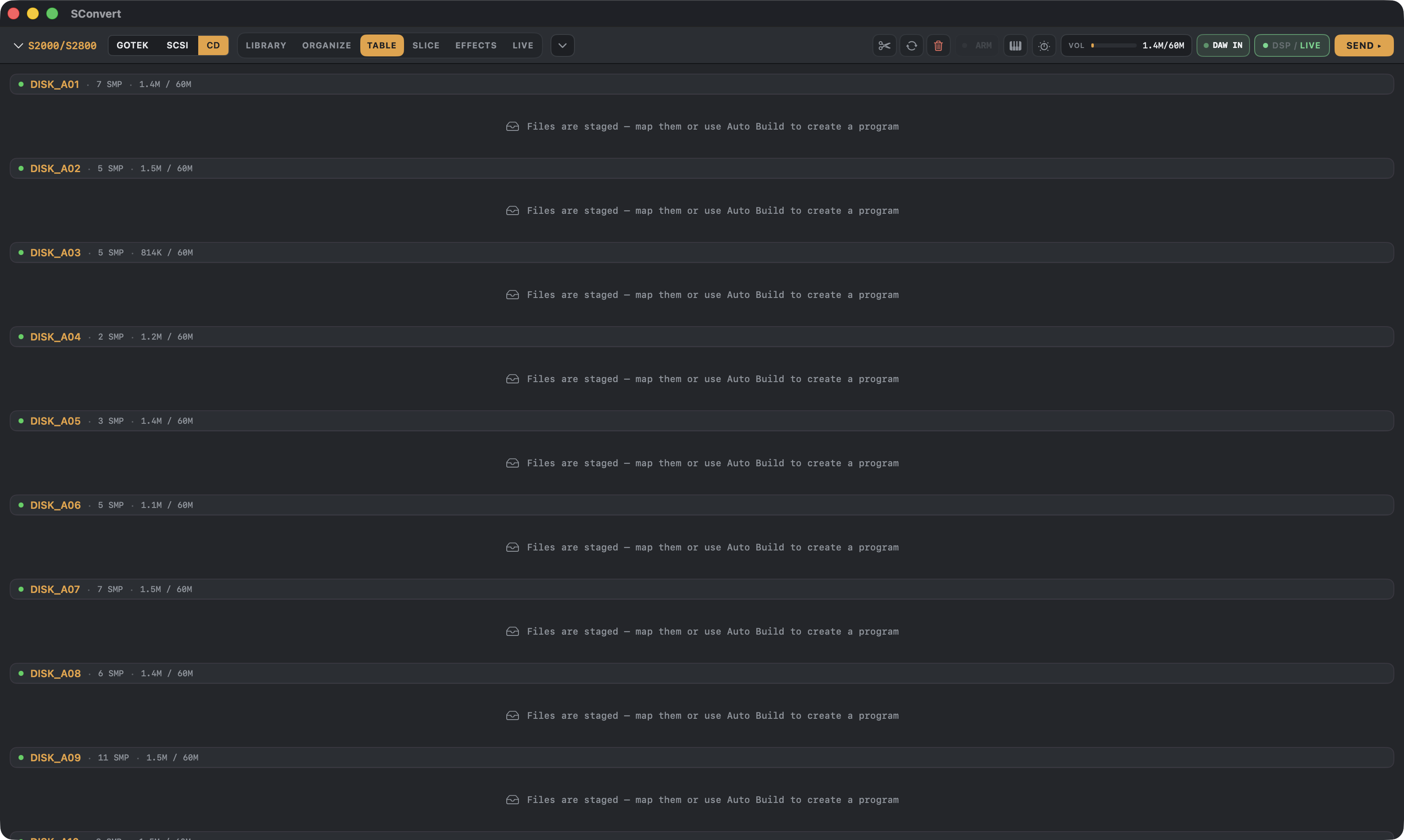
Hardware
Four ways onto the machine
- Gotek floppies — .img images (plus HFE for HxC firmware) for every model back to the S900.
- SCSI emulators — .hda drive images for ZuluSCSI and BlueSCSI, with multi-partition, multi-volume layouts. S-Convert can even flash ZuluSCSI firmware for you.
- PiSCSI / RaSCSI — the same .hda images work there too; load them your usual way. (Direct network push from the app is in beta.)
- ZBridge (beta) — our USB-C bridge loads samples and programs directly into sampler RAM, ReCycle-style, and gives you live MIDI control over SCSI. Proven on the S3200XL.
Live control: per-model MIDI SysEx profiles for filter, envelopes, LFO and zones on S900–S6000.
Output loaded and checked on Brendan's own S950 · S1100 · S3200XL. The other S-series models share those writers but have no separate hardware pass yet.
OPEN FIRMWARE
ZBridge runs our own firmware branch — an open-source (GPLv3) overlay on the ZuluSCSI-firmware project, pinned to a reproducible upstream build and published on GitHub. S-Convert flashes it onto a stock ZuluSCSI board for you, over SD card or USB bootloader.Formats
Reads almost anything.* Writes the classics.
Three tiers, ranked by what has been proven: Akai S-series (core, owner-tested), Akai MPC (beta, software-verified), and every other sampler (beta, software-verified, untested on hardware). The formats page has the per-model boundary, limitations and hardware status.
View all supported formatsImport
- WAV / AIFF / FLAC / CAF / MP3 / M4A / OGG
- ACID WAV & Apple Loops
- SoundFont 2 (.sf2) & DLS
- SFZ & DecentSampler presets
- Logic EXS24 (.exs)
- GigaSampler (.gig)
- MPC programs (.pgm / .xpm)
- Korg (.kmp/.ksf) & Kurzweil (.krz)
- Akai S1000/S3000 disk images (.img/.hda/.hfe/.iso)
- Akai S5000/S6000, Roland S-7x0 & Ensoniq EPS/ASR images
- E-mu EOS CD-ROMs and E4B banks (Emulator IV / Ultra)
- E-mu Emulator III/IIIx CD-ROMs and E3B/E3X banks; ESI banks and floppies (ESI CD-ROMs: catalog only)
- Beta: native banks and disk images from the other samplers on the formats page (Emax, Emulator I/II, Mirage, Roland S-series, Yamaha, Korg, Casio, Fairlight, Prophet 2000)
Formats are detected by content sniffing, not just extension.
* Several import formats are tested and proven; others are still being confirmed in beta. Hit a file that won't import? Send it over — beta reports are how the list gets bulletproof.
Akai targets
- S900Floppy image (Gotek)
- S950Floppy + SCSI images
- S1000Floppy + SCSI images
- S1100Floppy + SCSI images
- S2000 / S2800Floppy, SCSI + CD-ROM* images
- S3000 / S3200 / XLFloppy, SCSI + CD-ROM* images
- S5000 / S6000**AKP programs + WAV folders
* CD-ROM output is a work in progress.
** S5000/S6000 support is limited today — fuller support is planned.
MPC targets — beta
MPC60 / MPC60-II · MPC3000 · MPC2000 / MPC2000XL · MPC1000 / MPC2500 / MPC500 · MPC 2 / modern
Other samplers — beta, untested on hardware
E-mu Emulator I · E-mu Emulator II · E-mu Emulator III / IIIx · E-mu Emulator IV / EOS · E-mu ESI-32 / ESI-4000 / ESI-2000 · E-mu Emax I · E-mu Emax II · Ensoniq Mirage · Ensoniq EPS / EPS-16+ / ASR-10 / ASR-88 · Ensoniq ASR-X · Roland S-10 / MKS-100 / S-220 · Roland S-50 / S-51 / S-500 / S-550 / S-330 / W-30 · Roland S-750 / S-760 / S-770 / DJ-70 / DJ-70II · Roland MV-8000 / MV-8800 · Roland / BOSS SP-404SX · Roland SP-404MKII · Roland VP-9000 · Yamaha TX16W · Yamaha A3000 / A4000 / A5000 · Yamaha SU700 · Yamaha RS7000 · Korg DSS-1 / DSM-1 · Korg TRITON / Trinity · Korg Electribe ES-1 · Korg Electribe ESX-1 · Kurzweil K2000 · Kurzweil K2500 · Kurzweil K2600 · Kurzweil K2661 · Casio FZ-1 / FZ-10M / FZ-20M · Fairlight CMI II / IIx · Fairlight CMI III · Sequential Prophet 2000 / Prophet 2002 · Oberheim DPX-1 · Peavey DPM-SP / SP Plus
Software formats
Emulator X / X2 / X3 · GigaSampler / GigaStudio · SFZ · SoundFont 2 · Decent Sampler · Renoise instruments · Bitwig / PreSonus multisample · Renoise XRNI